
Parking should feel simple. Yet a full garage can still hide empty spaces, slow entry, and frustrate drivers. Choosing a Parking Management System is an operational decision, not just a software purchase. INRIX’s 2017 Parking Pain report estimated that U.S. drivers spent an average of 17 hours each year searching for parking, with related costs of about $345 per driver. The figures are dated and reflect that study’s methods, but they show why visibility and clear workflows matter. Not always.
An effective system should match a site’s real conditions: a hospital’s changing visitor demand differs from an office lot’s weekday pattern. Compare occupancy sensors or camera-based detection, digital payments, permits, access control, enforcement tools, and reporting. Check whether the platform connects with existing gates, payment terminals, and finance systems. Ask for uptime records, data-security documentation, support response times, and a live demonstration during a busy period. Small details count. Can drivers find available spaces? Can staff correct a mistaken plate entry without a lengthy process? UCLA professor and parking scholar Donald Shoup wrote, “Cruising for parking is an especially wasteful form of congestion.” His observation offers a useful test: does the system reduce uncertainty, or merely move it onto a screen? No platform fixes poor layouts or unclear signs by itself. Use this guide to compare total costs, service quality, integration needs, and measurable outcomes before choosing.
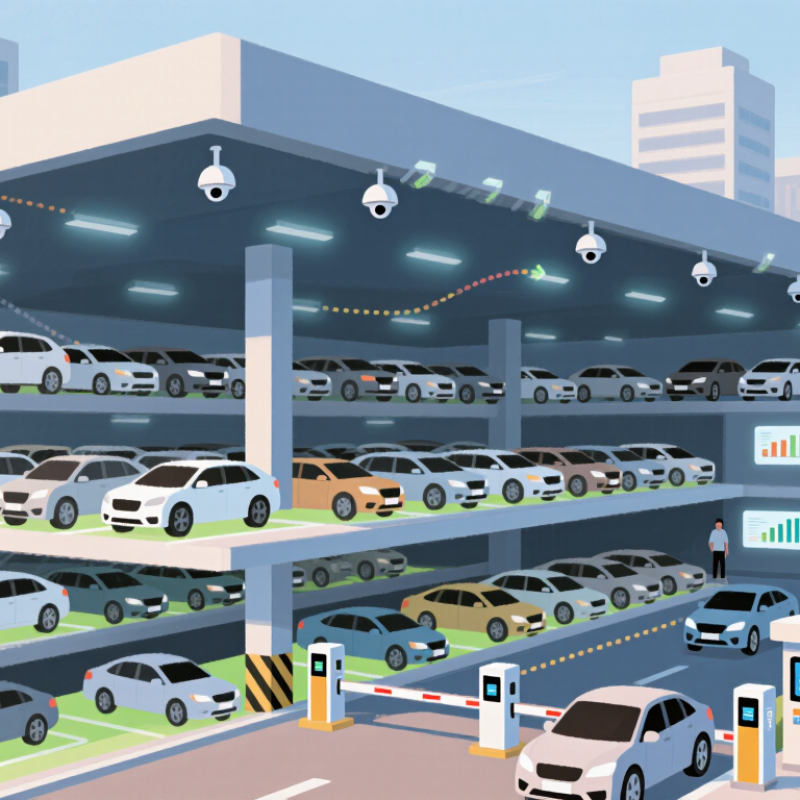
Before comparing parking management systems, observe how your site works during ordinary and peak periods. Count arrivals during the busiest hour, note average stay lengths, and record where queues form. A garage serving office staff has different demands from a clinic with frequent short visits. Watch the entrance at 8:30 a.m. Small details matter.
Then define who uses the facility and what each person needs to do. List monthly permit holders, visitors, delivery drivers, and staff who handle exceptions. Decide whether drivers need reservations, contactless payment, accessible spaces, or clear directions between zones. Identify existing equipment, such as entry gates, pay stations, and occupancy sensors. Record what must connect to current accounting or access tools. Avoid choosing features just because they look impressive.
Set measurable requirements before reviewing demonstrations. Specify how quickly attendants should resolve a failed ticket, how often occupancy data should update, and which reports managers use each week. Assign an owner to each task, and set a realistic budget and support expectation. Test the proposed workflow with a busy-day scenario, not only a smooth demonstration. Some assumptions will be wrong. That is useful. A short trial can reveal bottlenecks that planning missed.
Parking management systems differ in how they admit vehicles, track spaces, and handle payment. Gate-and-ticket systems suit facilities with defined entrances and staffed operations. They create a clear record, but ticket machines and barriers need regular checks. A jammed dispenser can quickly form a queue.
Camera-based systems read license plates at entry and exit, reducing the need for paper tickets. They can work well in busy lots, though glare, rain, or a dirty camera lens may affect readings. Test them at night and during peak traffic before choosing one. Automation still needs oversight.
Permit and mobile-payment systems fit campuses, residential buildings, and mixed-use sites where drivers come and go. Managers can update permits remotely, while drivers pay by phone or at a kiosk. That matters. Check how the system handles visitors, weak cellular coverage, and payment disputes. Cloud-based tools make remote monitoring easier; locally hosted systems may offer more control over stored data. Ask about access permissions, backup procedures, and support response times. No setup is perfect. A smaller lot may need only permits and clear signs, not cameras, gates, and a complex dashboard. Compare the daily tasks your staff actually perform with each system’s costs and maintenance needs.
A parking management system should match a site’s daily rhythm, not just its sales demonstration. Check occupancy accuracy, payment options, permit controls, enforcement tools, and connections to gates and accounting systems. Ask for accuracy results across different stall types and weather conditions. A camera may miss a snow-covered space and send drivers in circles. Small detail. Test the dashboard during a real peak period, not with a polished sample screen. The 2023 Global Traffic Scorecard estimated that U.S. drivers lost 42 hours to congestion that year. Parking searches are only one contributor, but dependable availability data can help reduce unnecessary circulation.
Technology matters most when it remains useful during outages. Look for open interfaces, straightforward data exports, role-based access, encryption, audit logs, and clear recovery targets. Confirm whether sensors or cameras process information on-site or in the cloud, and how long records are retained. The 2023 Cost of a Data Breach Report estimated the global average breach cost at $4.45 million. That figure is not parking-specific, but it makes security a practical procurement concern. Ask the team to demonstrate how staff restore access when connectivity fails. Test it live.
More data does not always mean better decisions. One awkward truth: extra dashboards can create extra work for attendants. Compare the time needed to resolve a payment dispute or find an occupied accessible stall. Then check maintenance requirements, replacement costs, and staff training needs. A system can look impressive and still frustrate users at the curb. I would leave room for doubt: pilot the setup in one area before expanding across the whole facility.
| Evaluation Dimension | What to Evaluate | Questions and Evidence to Check | Suggested Weight |
|---|---|---|---|
| Occupancy and availability | How the system detects, updates, and displays space availability across facilities, zones, or floors. | Test occupancy updates during arrivals and departures. Check how the system handles sensor or network outages and whether staff can correct inaccurate space status. | 12% |
| Payments and pricing | Support for applicable payment methods, tariffs, validations, refunds, and transaction records. | Run test transactions for common parking scenarios. Confirm how rates, grace periods, discounts, taxes, refunds, and payment reconciliation are configured and reported. | 10% |
| Permits and access rules | Management of permits, reserved spaces, customer groups, time restrictions, and entry or exit permissions. | Verify that staff can create, change, expire, and revoke permissions. Test overlapping rules, permit renewals, and exceptions such as temporary access. | 8% |
| Integrations and data exchange | Compatibility with existing payment services, access equipment, accounting tools, customer systems, and reporting workflows. | Review available interfaces, data formats, authentication methods, integration responsibilities, and any additional fees. Test the specific integrations required for the site. | 10% |
| Hardware and connectivity | Compatibility with gates, ticket devices, payment terminals, cameras, sensors, and the facility's network environment. | Confirm supported equipment and installation requirements. Ask what continues to operate during internet or power interruptions and how queued data is reconciled afterward. | 10% |
| Reliability and recovery | Service availability, backup procedures, incident communication, and recovery after system or equipment failures. | Review documented service commitments, maintenance windows, backup and restoration procedures, incident history, and the process for operating manually during an outage. | 12% |
| Security and privacy | Protection of accounts, payment-related data, vehicle information, and other personal or operational records. | Check role-based access, multifactor authentication options, encryption practices, audit logs, data retention controls, incident response, and applicable privacy obligations. | 12% |
| Reporting and administration | Access to operational, financial, occupancy, and exception reports, with useful filtering and export options. | Build sample reports for the organization's actual needs. Check data definitions, export formats, report scheduling, access controls, and whether records can be traced to source transactions. | 8% |
| Usability and accessibility | Ease of use for drivers, attendants, administrators, and support staff, including accessible customer-facing steps. | Ask representative users to complete common tasks. Review mobile and web workflows, language options, accessibility features, training needs, and the clarity of error messages. | 8% |
| Scalability and ongoing support | Ability to accommodate additional sites, users, equipment, and transaction volumes, alongside dependable maintenance and support. | Review capacity limits, configuration effort for new locations, support hours and escalation paths, software update practices, documentation, and total cost over the expected service period. | 10% |
| Total suggested evaluation weight | 100% | ||
Suggested weights are a starting point, not a universal standard. Adjust them to match facility size, operating model, user needs, and procurement priorities.
Check Integration, Security, and Compliance
A parking management system should connect cleanly with tools already in use, such as payment terminals, access gates, and occupancy sensors. Ask vendors to demonstrate a real data flow, not just show a feature list. For example, confirm that a gate can receive an updated permit promptly and that staff can review failed transactions. Check how the system handles outages, too. Test the failure path. A polished demo may not reflect a rainy Monday with a stalled sensor.
Tips: Request a simple integration map and a sample data-retention schedule. Ask who can view vehicle or payment records, how access is logged, and how quickly permissions can be removed when staff roles change. Confirm that data is encrypted in transit and at rest. Keep it practical.
Compliance depends on your location and the information your operation collects. Verify applicable privacy, accessibility, payment, and record-keeping requirements with qualified advisers; a supplier’s assurance is not a substitute. Review security updates, backup procedures, incident response, and independent audit evidence. A system can meet today’s needs yet create extra work as rules or parking operations change. Document open questions, assign an owner to each, and revisit them before renewal. One checklist will miss something; leave room to reassess.
A parking system can look affordable until hardware, payment fees, integrations, and staff training appear on the invoice. Compare three-year total cost, not just the monthly license. INRIX’s 2023 Global Traffic Scorecard estimated that U.S. drivers lost 42 hours to congestion, costing $733 per driver that year. This is not a direct estimate of parking-software savings. It does show why smoother arrivals and exits matter.
Ask vendors to price sensors, payment processing, data migration, and after-hours support separately. Then test a small site during real peak-hour traffic. Record entry queues, failed transactions, refund times, and staff minutes spent fixing errors. Support quality matters. IBM’s 2023 Cost of a Data Breach report put the global average breach cost at $4.45 million across industries. That is not a parking forecast, but it makes patching, backups, incident response, and data ownership worth discussing. Implementation needs are often underestimated. Map who will clean equipment, reconcile payments, and train weekend staff before signing. Check compatibility with existing gates and accounting tools, and request a written migration schedule. Keep a rollback plan. Contracts should define response times, uptime measurements, data-export formats, and exit fees. One caveat: a pilot can miss winter weather or event-day demand, so test beyond a quiet weekday.
Count arrivals during the busiest hour, average stay lengths, and queue locations. Watch the entrance around 8:30 a.m. Small details matter.
An office garage may serve monthly permit holders, while a clinic sees frequent short visits. List visitors, delivery drivers, and staff needs.
Gate-and-ticket systems create clear entry records. Camera-based systems can reduce paper tickets, while permit and mobile-payment tools suit changing access needs. No setup is perfect.
Test readings at night and during peak traffic. Glare, rain, or a dirty lens may cause missed plates. Automation still needs oversight.
Check visitor access, weak cellular coverage, and payment disputes. A small lot may need permits and clear signs, not a complex dashboard.
Confirm that it connects with existing payment terminals, gates, and occupancy sensors. Ask to see a real data flow, including failed transactions.
Ask who can view records, how access is logged, and how quickly permissions can be removed. Confirm encryption, backups, and incident response procedures.
Verify local privacy, accessibility, payment, and record-keeping requirements with qualified advisers. Assign owners to open questions and revisit them before renewal. One checklist may miss something.
Choosing the right Parking Management System starts with a clear understanding of your operations. Consider the number and type of parking spaces, how people enter and pay, peak usage, staffing needs, and any plans for future growth. Then compare system types to find an approach that fits your location, users, and day-to-day processes.
Evaluate essential features such as space availability, payment options, reporting, and ease of use, along with the technology needed to support them. Check that the system can connect with your existing tools and offers appropriate data security and privacy safeguards. Finally, compare the full costs, including setup, ongoing service, and maintenance. Ask about staff training, customer support, installation timelines, and the steps required to launch. A thoughtful comparison can help you select a practical system that improves operations while remaining manageable over time.
